A page is never built in one move. It arrives in stages, and every stage carries one decision that feels settled the second you make it. First the page needs something to hold. Then it needs an address. Then it needs a look. Three tools went live on liczgrupa.pl today, one for each of those moments, and what ties them together is not the category they sit in.
It is that all three replace a judgement you would otherwise make by looking at the screen and deciding it seems fine.
Seeming fine is where this gets expensive. What follows is each stage with the number that actually settles it, and in two of the three the number flatly disagrees with the glance.
Stage one, before the page holds anything
An empty table cannot be tested. You need rows, the rows need names, and the moment you type "Test User 1" into a fixture you have built something that will never behave like the data it stands in for. Real names carry apostrophes. They carry accents. They sort in ways that surprise people who have only ever sorted ASCII. They are also, awkwardly, real people's names, which is why pulling a handful out of your own head is a worse idea than it looks.
The Random Name Generator draws from curated regional lists instead. Ask it for five English names with the seed coffee and you get this:
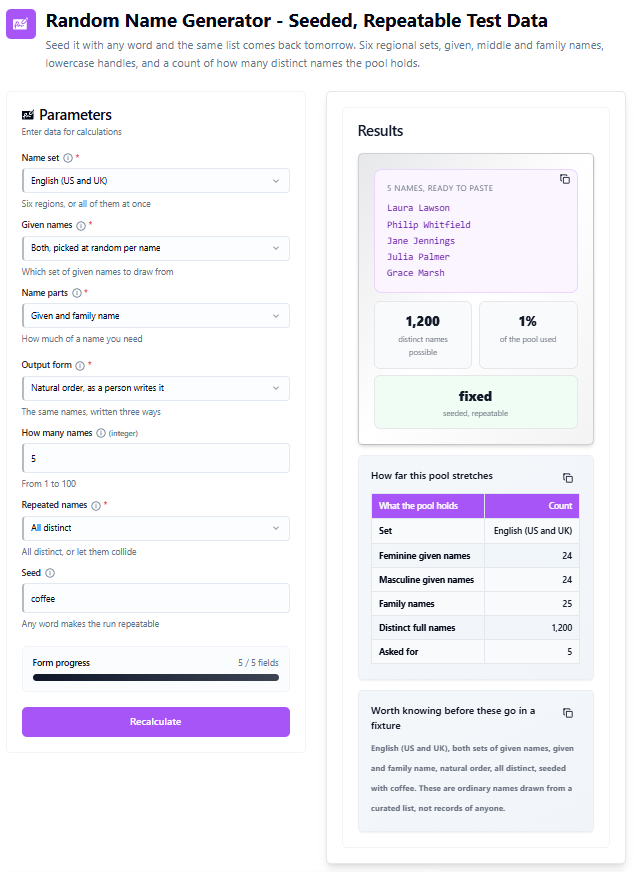
Laura Lawson, Philip Whitfield, Jane Jennings, Julia Palmer, Grace Marsh. Nothing startling, and that is the point of a fixture. The interesting field is the last one: Seed. Put any word there and the same five come back tomorrow, next week, on a colleague's machine, in a pipeline running at three in the morning. A fixture that reshuffles itself on every run is a fixture that cannot fail the same way twice, and a failure you cannot reproduce is a failure nobody will fix.
How far 1,200 names actually stretches
Under the list the tool reports the size of the pool it drew from. That number deserves more attention than the names do.
| What the pool holds | Count |
|---|---|
| Feminine given names | 24 |
| Masculine given names | 24 |
| Family names | 25 |
| Distinct full names | 1,200 |
| Asked for | 5 |
Twenty-four feminine given names, twenty-four masculine, twenty-five family names. Multiply the given names by the family names and the English set holds 1,200 distinct combinations. Taking five of them uses well under one percent, which reads like enormous headroom.
It is not. The arithmetic here is the one that puts two shared birthdays in a room of twenty-three people, and it bites far earlier than the pool size suggests. With All distinct selected the tool simply refuses to repeat, so the question never surfaces. Switch it to Allow repeats, as real data does, which is the honest setting when you are testing how your code handles a duplicate, and the odds move quickly. These are not calculator output, they are the standard collision formula applied to the 1,200 the tool reports:
| Names drawn | Share of the pool | Chance of at least one repeat |
|---|---|---|
| 5 names | 0.4 % | 0.8 % |
| 10 names | 0.8 % | 3.7 % |
| 25 names | 2.1 % | 22.3 % |
| 50 names | 4.2 % | 64.5 % |
| 100 names | 8.3 % | 98.6 % |
Fifty names is four percent of the pool and it is already more likely than not that two of them match. At a hundred it is close to certain. So if a seeded fixture has to fill a hundred distinct rows, one regional set will not carry it comfortably, and the fix is not to ask harder. It is to draw from a bigger pool: English, Irish and Scottish, Spanish, German, Nordic and Polish each hold their own lists, and the mixed setting draws across all six at once.
There is a second reason to reach past the English set, and it lands squarely in the next stage. Accented letters.
Stage two, when the page gets an address
The page holds something now, so it needs a path. Most content systems will build one for you and most of the time the result is perfectly good. The trouble is the case where it is not, because nothing anywhere announces it.
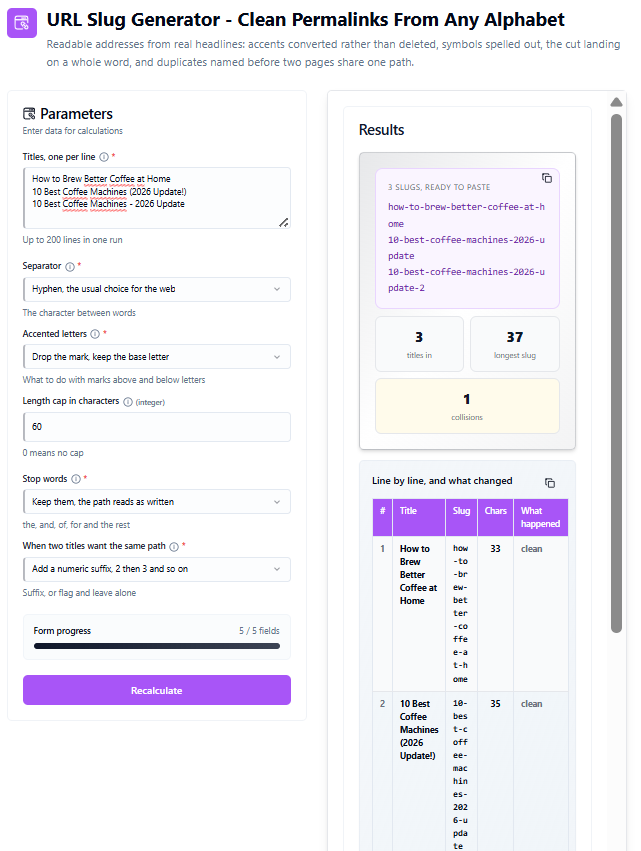
Three headlines through the URL Slug Generator, hyphens between words, accents reduced to the base letter, capped at sixty characters:
| Title | Slug | Chars | What happened |
|---|---|---|---|
| How to Brew Better Coffee at Home | how-to-brew-better-coffee-at-home | 33 | clean |
| 10 Best Coffee Machines (2026 Update!) | 10-best-coffee-machines-2026-update | 35 | clean |
| 10 Best Coffee Machines - 2026 Update | 10-best-coffee-machines-2026-update-2 | 37 | duplicate, suffixed |
Read rows two and three again. Those are different headlines. A person would never mistake one for the other, and an editor approving them a week apart would never think to check. Strip the parentheses, the exclamation mark and the loose hyphen, which is what every slug builder on earth does, and both land on 10-best-coffee-machines-2026-update. One address, two articles.
What if the only difference is punctuation?
Then you have a collision, and what happens next comes down to a setting almost nobody opens. With Add a numeric suffix the second article becomes 10-best-coffee-machines-2026-update-2 and stays reachable, which is the outcome most systems pick by default. The tool is blunt about the cost in its own notes: a suffix keeps the page reachable but says nothing to a reader, so a different title is usually the better fix. It also hands a search engine two pages arguing over one phrase, which is a slower and more annoying problem than a broken link.
The other setting flags the clash and leaves the path alone. In practice that means the second article quietly fails to publish, or quietly replaces the first. Neither of those is visible from an editor screen. Neither of them throws anything.
Which is the whole argument for running a batch of headlines through before publication rather than after. The collision count is the only place the problem is legible, and it costs about two minutes to look at. The longest slug of the three came out at 37 characters, well inside the sixty character cap, so nothing was trimmed here. Push the cap down and the cut moves, always at the last whole word, never through the middle of one.
Stage three, when the page gets a look
The page holds something and it has an address. Now somebody drops a heading onto a gradient, tilts their head at it, and says it reads fine.
Here is a two stop linear gradient, dark navy to yellow, running at ninety degrees, with white text on top, through the CSS Gradient Generator:
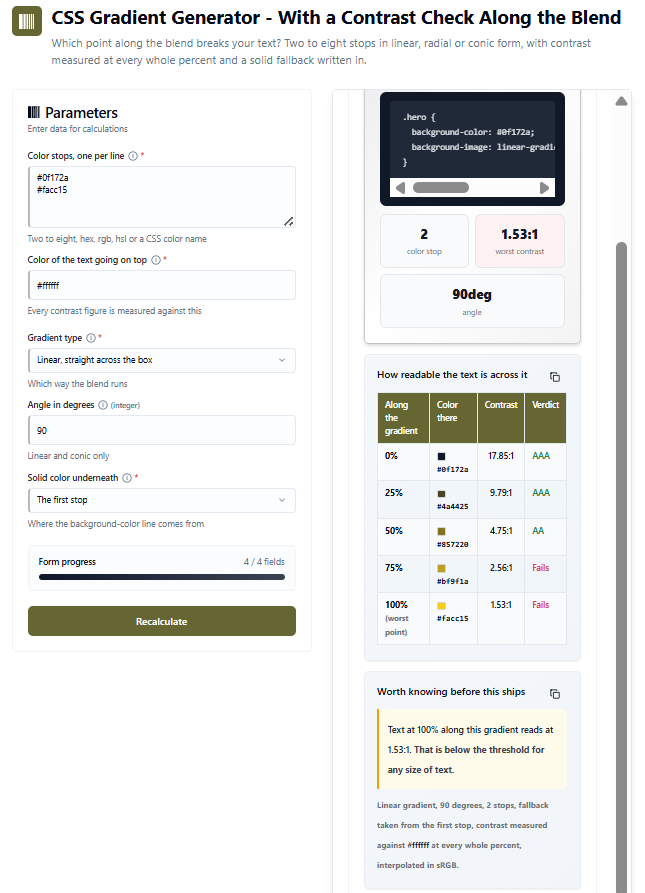
The CSS it writes is three lines and entirely unremarkable. The table underneath it is not.
Where the contrast actually breaks
| Along the gradient | Color there | Contrast | Verdict |
|---|---|---|---|
| 0 % | #0f172a | 17.85:1 | AAA |
| 25 % | #4a4425 | 9.79:1 | AAA |
| 50 % | #857220 | 4.75:1 | AA |
| 75 % | #bf9f1a | 2.56:1 | Fails |
| 100 %, the worst point | #facc15 | 1.53:1 | Fails |
At the left edge white text on that navy reads at 17.85:1, more than twice what the strictest accessibility level asks for. Halfway across it is 4.75:1, which still clears the AA threshold for normal text, though not by much. By three quarters of the way it is 2.56:1 and it has failed, and it has failed for large text too. At the right edge it is 1.53:1, below the threshold for text of any size that exists.
So here is the question worth sitting with: of those five points, which one were you going to look at? The ends, almost certainly, because the ends are where the color pickers are and where your eye goes. And the ends are exactly the two points that tell you the least, because one of them is spectacular and the other is the worst reading on the entire sweep. The decision lives in the stretch between fifty and seventy-five percent, where the line crosses from passing to failing, and the only way to find that crossing is to measure every whole percent along the way.
Changing the angle moves where that stretch falls on the box. It does not remove it. A 45 degree, 90 degree, 135 degree or 180 degree sweep pushes the same five readings around the same rectangle. Switching to a radial or conic shape changes the path the blend travels, and the contrast column follows it there.
The three stages, side by side
| Stage | What it looks like from the screen | What the number said |
|---|---|---|
| It holds something | Five plausible names, clearly random | A pool of 1,200, and 64.5 % odds of a repeat by fifty draws |
| It has an address | Three distinct headlines | Two of the three reduce to one path |
| It has a look | A gradient that reads fine | AA lost between 50 % and 75 %, worst point 1.53:1 |
Two of those three rows are a disagreement between what a screen shows and what a measurement says. The first row is not a disagreement at all, and it is arguably the most useful of the three, because it is the one where the tool tells you the shape of a limit before you walk into it.
What if you change one setting?
Run the same three stages again with one field moved in each, and the shape of the answer changes more than the effort does.
Change the seed from coffee to any other word and you get a different five names that are equally repeatable. Change it back and the original five return. That is the whole feature, and it is the difference between a fixture and a lottery ticket.
Change the duplicate handling from suffix to flag, and row three of the slug table stops being a slightly ugly URL and starts being a publishing failure. Same input, same collision, completely different consequence, decided by a dropdown.
Change the gradient from two stops to three by putting the navy back at the end, and the failing stretch moves off the edge and into the middle of the box, which is worse, because the middle is where headings sit. The worst reading stays 1.53:1. Only its address on the page changes.
None of that is deep. It is just the difference between deciding by eye and deciding by number, at three moments where the eye is reliably wrong.
Tools discussed in this article
Random Name Generator - seeded names from six regional sets, with the size of the pool reported alongside the list so you know how far it stretches.
URL Slug Generator - turns a batch of headlines into paths, converts accented letters instead of deleting them, cuts on a whole word and names every collision before two pages share an address.
CSS Gradient Generator - linear, radial and conic blends with a solid fallback line, and text contrast measured at every whole percent along the sweep.
More text tools
Business Name Generator - builds company names from a keyword and reports which of them still have an obvious domain shape left.
Table Generator - turns pasted rows into HTML, Markdown or CSV without hand-writing the tags.
Lorem Ipsum Generator - placeholder text by words, sentences or paragraphs when you need to see a layout before the copy exists.
Anagram Generator - rearranges the letters you brought and shows how many arrangements the word actually allows.
Palindrome Generator - checks a phrase in both directions and points at the first character where the two disagree.
More code tools
UUID Generator - versions 1, 4, 5 and 7 in bulk, plus an inspector that reads an existing identifier back and tells you what is embedded in it.
SEO Meta Tag Generator - writes the head block and measures the title in width units rather than characters, which is the unit a search result actually uses.
UTM Link Generator - builds tracked links and reports which default channel group your source and medium pair will land in.
QR Code Generator - encodes text, links, Wi-Fi credentials and contact cards, and reports the version, module count and correction level it chose.
Barcode Generator - EAN-13, EAN-8 and UPC-A with the check digit calculated rather than assumed.