
Take one web address, liczgrupa.pl/en/tools, twenty nine bytes of it. Encode it into a QR code at error correction level L and you get a symbol 25 modules square. Encode the same address at level H and you get 33. That is 74 percent more area carrying exactly the same information, and if both are printed at the same width, every module in the second one is 24 percent narrower.
Which matters, because module width is what a camera has to resolve. The setting people reach for when they want a code to be more reliable is the setting most likely to stop it working.
That pattern turns up in all three of the generators published today. Something looks finished on the screen where it was made and comes apart on the screen where it is used. Below are the three failures, the numbers that predict each one, and what to check before anything goes to print.
Bytes decide the version, the version decides whether it scans
A QR symbol comes in forty sizes, called versions. Version 1 is 21 modules square and every step up adds four modules per side, so version 40 is 177. You do not choose the version. Your payload chooses it, and the correction level chooses it too, because recovery data occupies room that would otherwise hold your text.
The consequences are easier to see with two payloads from the same tool. A phone number, tel:+441234567890, is 17 bytes and encodes into a version 2 symbol at 25 modules. A contact card carrying a name, a company, a phone number and an email address is 161 bytes and needs version 9 at 53 modules. Print both at the same size on the same business card and the modules in the contact card are 53 percent narrower than the ones in the phone number.
| Correction level | Recovers about | Symbol for a 29 byte address | Area in modules |
|---|---|---|---|
| L | 7 percent | version 2, 25 square | 625 |
| M | 15 percent | version 3, 29 square | 841 |
| Q | 25 percent | version 3, 29 square | 841 |
| H | 30 percent | version 4, 33 square | 1089 |
Read the middle two rows again. M and Q land on the same version for this payload, so on this address the jump from 15 percent recovery to 25 percent is free. Nobody discovers that by guessing; you discover it by encoding the thing twice and reading the version back. The generator prints the version, the module count and the mask under every code for exactly that reason.
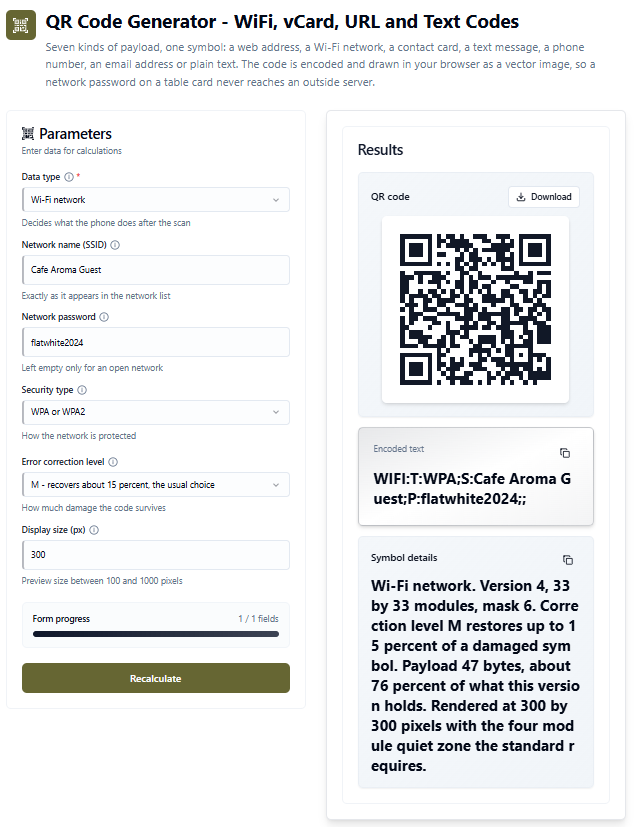
The Wi-Fi code above is 47 bytes, which puts it at version 4, 33 modules, filling 76 percent of what that version holds. Add three characters to the network name and it tips into version 5. That is the whole mechanism: a payload sits in a version until it does not, and then the code gets denser at the same printed size.
One more thing the screen will not tell you. The standard requires a clear margin of 4 modules on every side, because a scanner locates the symbol by finding the three corner squares and needs blank space to know where the code ends. Crop tight to the black edge and a code that scanned perfectly in the browser stops scanning on paper. The export includes that margin, which is why a version 1 code comes out on a grid of 29 rather than 21.
One character can eat a column
Tables fail differently. Nothing is too small to read; the structure simply stops being a structure.
In Markdown the pipe is the cell boundary. A cell holding the text 10 | 20, which is a perfectly ordinary way to write a range, silently becomes two cells, and every row below it stops lining up with the header. The fix is one backslash, 10 \| 20, and almost nobody types it by hand because the problem is invisible until the table is rendered somewhere else.
| What is in the cell | Where it breaks | What has to happen |
|---|---|---|
| A pipe, as in a range | Markdown, splits the row | escape it with a backslash |
| An angle bracket or an ampersand | HTML, gets interpreted | escape it in the markup, leave it alone in the Markdown you copy |
| A comma inside an address or a title | CSV, invents a column | export with tabs or semicolons instead |
| A row that is shorter than the rest | everywhere, misaligns from there down | pad it, and say how many cells were added |
The last row is the one people underestimate. Spreadsheet selections are routinely ragged, because the final row was never finished. Dropping the short rows loses data and truncating the long ones loses columns, so the generator pads to the widest row and reports what it did: a three column range whose last two rows are short comes back with 3 empty cells added, stated in the summary rather than done quietly.
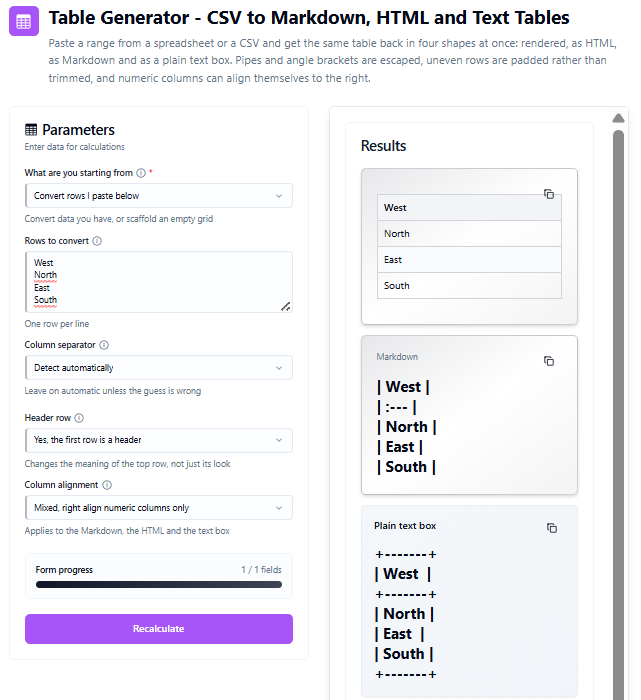
The summary underneath is worth reading rather than skipping. It names the separator it settled on, and if no separator was found at all it says so instead of naming one, which matters because a wrong guess about the separator explains every other thing that looks wrong above it.
A name has to fit the sign and the address bar
The third failure is the slowest. A company name is chosen on a screen, in title case, in a font that flatters it, and then has to survive being lowercased into a domain, read aloud down a phone line, and squeezed onto a sign.
Length is where that gets decided, and the effect is not gentle. For a software business the number of usable names in the professional style runs from 87 at a ten character ceiling to 169 at fourteen. In the playful style, the same ceilings give 157 and 190. The reason is arithmetic rather than taste: the professional vocabulary averages 8.4 letters and the playful one 5.3, so at a tight ceiling the serious style runs out of room first.
| Maximum length | Professional style | Playful style | What the ceiling is doing |
|---|---|---|---|
| 10 characters | 87 | 157 | cutting hard, and unevenly between styles |
| 12 characters | 135 | 187 | still shaping the result |
| 14 characters | 169 | 190 | nearly everything is available |
| 20 characters | 190 | 190 | doing nothing at all |
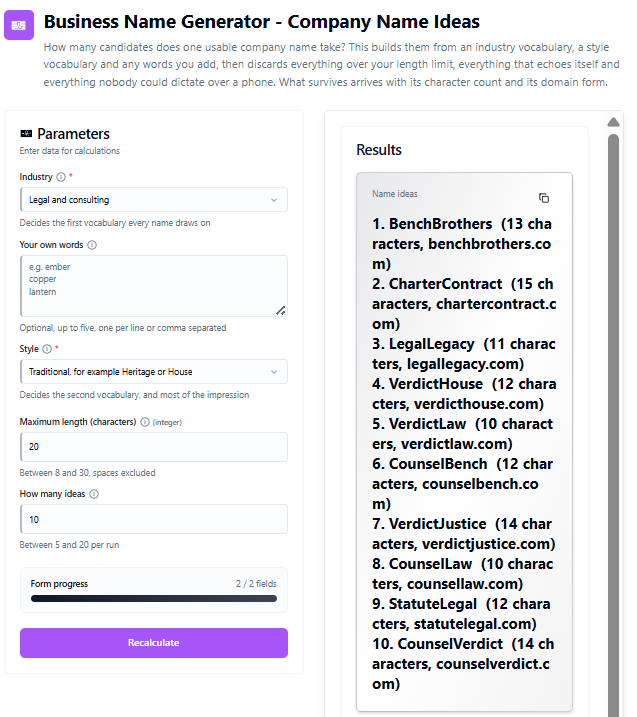
The run above asked for a legal business, traditional style, ceiling of twenty. The ten names come back between 8 and 14 characters, averaging 12.6. That average was predictable before the button was pressed: the legal vocabulary averages 6.2 characters and the traditional one 6.3, so 12.5 was the expected length of two of them joined. The ceiling of twenty never came into play, and six characters of headroom went unused.
Which is the useful lesson about that setting. A ceiling only does something when it is below the natural length of the vocabulary. Set it at twenty for this pair and you have not made a decision; set it at ten and you have thrown away half the pool.
If you want to start from a sector rather than from the form, these go straight to a set for one trade:
Software · Finance · Marketing · Education · Health · Construction · Hospitality · Online retail · Legal · Manufacturing · Design · Fitness
Four things that only show up on someone else's screen
Raising error correction without re-reading the version. It feels like a safety margin and it is often a size increase. Encode the payload at two levels, compare the module counts, and take the higher level only when it does not push you into a bigger version.
Cropping a QR code to its black edge. The four module margin is part of the symbol, not whitespace around it. This is the single most common reason a freshly printed code refuses to scan.
Trusting a table because it looked right where you built it. A pipe, a stray comma in an address, or a row two cells short will all render acceptably in one place and fall apart in the next. Read the summary line, not the preview.
Judging a name in title case. CounselHouse reads cleanly with the capitals doing the work of a space. As counselhouse.com the seam disappears and the eye has to find it again. The domain form is printed next to every candidate so that comparison happens before you get attached to one.
Five rules
- Measure the output, not the input. Bytes, module counts, character counts and cell counts are all reported for a reason. A tool that tells you what it produced is doing half the checking for you.
- Shorten the payload before you enlarge the print. Dropping a company line from a contact card moves it several versions down, which does more for scannability than any amount of extra paper.
- Escape at the boundary, not in the source. Angle brackets are escaped in the rendered markup and left alone in the Markdown you copy, because those two are read by different things.
- Pad ragged data and say so. Silently dropping the tail of a row is the one failure nobody catches, because the table looks perfectly healthy afterwards.
- Set a limit only where it bites. A ceiling above the natural length of your vocabulary is not a constraint, it is a decoration.
Tools discussed in this article
QR Code Generator - encodes a link, a Wi-Fi network, a contact card, an SMS draft, a phone number, an email address or plain text, and reports the version, module count and mask it settled on. The symbol is built in your browser and drawn as vector, so nothing you type reaches an outside server.
Table Generator - turns a pasted range into a rendered table, HTML, Markdown and a plain text box at once, detecting the separator, escaping what has to be escaped and padding ragged rows rather than trimming them.
Business Name Generator - builds candidates from an industry vocabulary, a style vocabulary and your own words, discards the ones over your ceiling, the ones that echo themselves and the ones nobody could dictate, and prints the character count and domain form beside each survivor.
More text tools
Lorem Ipsum Generator - placeholder copy by word, sentence or paragraph count, with the character budget it consumes.
Anagram Generator - rearranges the letters of a word and counts how many arrangements exist.
Palindrome Generator - checks a phrase both ways and shows where the first mismatch falls.
More code and random tools
Barcode Generator - EAN-13, EAN-8 and UPC-A with the check digit worked out term by term and the bars drawn locally.
WiFi Password Generator - a guest network password worth putting on the card next to the code.
Password Generator - length and character set under your control.
Nickname Generator - the same joining idea applied to a handle rather than a company.